HOST · PLUG-IN CHAIN · 30
Still Stack
A whole chain in one insert: up to eight plug-ins, saved and recalled together, or one of 24 ready-made Still chains.
What it does
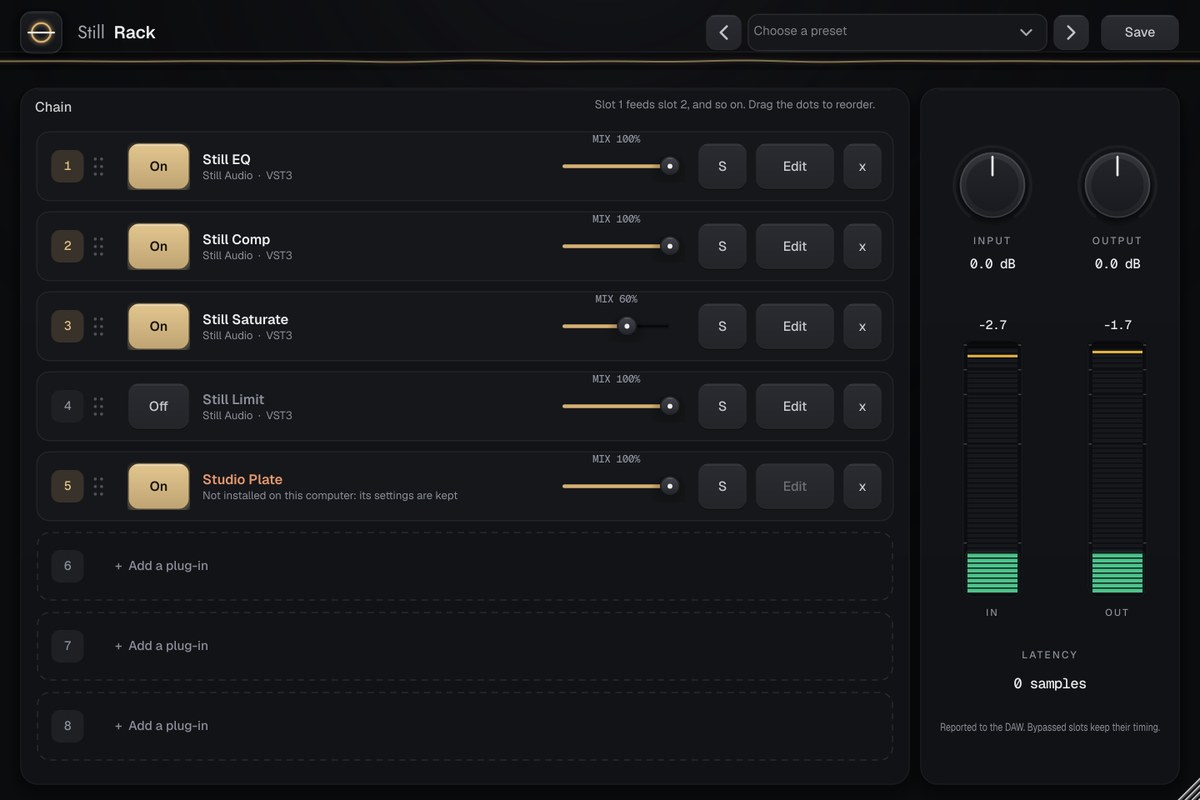
Still Stack holds up to eight plug-ins in a row: slot 1 feeds slot 2, and so on. Any installed VST3 (and AU on the Mac) can go in a slot, Still Audio's own or another maker's. Each slot can be switched off, soloed or blended with the dry signal, and its own window opens with Edit.
In 5.17 Still Chains became part of Stack: its preset menu has 24 ready-made chains of Still plug-ins for vocals, speech, drums, bass, guitars, keys and buses. Pick one and the slots fill with the Still plug-ins, each already set for that job.
Key features
- 24 ready-made chains in the preset menu: Vocals, Speech, Drums, Bass, Guitars & keys, Buses & stream
- Eight slots in series; drag to reorder, x to remove; changes cross-fade, the audio never stops
- Per slot: On/Off (bypassed slots keep their timing), Solo, Mix (dry delayed to match, so no comb filtering), Edit
- Scan never loads plug-ins inside your DAW: a separate scanner program opens each one; crashes and sign-in waits are skipped
- Input and Output trims with meters; the chain's latency shown and reported to the DAW
- A plug-in missing on another computer keeps its slot and its settings until it is installed again
Quick start
- Insert Still Stack on the channel or bus.
- Pick a chain from the preset menu ("Vocals: Worship lead, higher voice" ...), or click + Add a plug-in to build your own.
- Open any slot with Edit and adjust it for the singer or the room.
- Save the chain as your own preset to use it on other channels.
Controls
| Control | Range | What it does |
|---|---|---|
| Preset menu | Empty stack, 24 chains, yours | Load a ready-made chain or one you saved. Chains find the Still plug-ins by name; no scan needed. |
| On / S | On, Off / Solo | Bypass the slot (timing kept) / hear only this slot's processing in the chain. |
| Mix | 0–100% | Blend the slot's output with its input, in time. |
| Edit / x | Window / remove | Open the plug-in's own editor / empty the slot. |
| Dots | Drag | Move the slot up or down the chain. |
| Input / Output | −24 to +24 dB | Trim before the chain / after it. |
FACTORY PRESETS
Empty stack · Vocals: Worship lead, higher voice · Worship lead, lower voice · Gospel lead, powerful · Lead vocal, tame harshness · Lead vocal, clear the mud · Backing vocals · Choir mics · Speech: Pastor / pulpit mic · Lapel / headset · Podcast / interview voice · Announcements / MC · Drums: Kick, punch · Snare, crack · Toms · Overheads / cymbals · Drum bus · Bass: Bass DI, solid · Gospel bass, punchy · Guitars & keys: Acoustic guitar · Electric guitar · Keys / piano · Buses & stream: Vocal bus · Worship mix bus · Livestream mix bus
GOOD TO KNOW
Tested with Still plug-ins hosted inside: bit-exact pass-through when empty; bypass, solo and reorder; 120 random load / remove / move edits while audio runs with no glitch. A chain loads each Still plug-in with that chain's settings (checked: the vocal chains' EQ lands on its 100 Hz low cut). Stack adds no latency of its own; the hosted plug-ins use what they always use.